


Amazon’s new ‚About You‘ page creeps out users
Amazon’s ‚About You‘ page sparks concern as the ‚Outnumbered‘ panel reacts to the retail giant’s data tracking. Kayleigh McEnany, Kat Timpf, Adam Carolla, Harris Faulkner and Kennedy discuss a viral post regarding the discovery.
NEWYou can now listen to Fox News articles!
Amazon knows what you buy, what you search for and even what you tell its shopping assistant. Now, the company is giving you a look at the personality profile it has built from all that information. When I checked my own Amazon About You profile, I found 81 results, including a reference to my mother that caught me off guard. The feature brings together details about your shopping habits and preferences. Some are helpful. Others might make you wonder how Amazon reached those conclusions in the first place.
Shoppers are now sharing screenshots of descriptions that range from funny to completely inaccurate. Amazon says the feature helps improve shopping recommendations. However, it also raises an interesting privacy question. How much should a retailer know about you, and how much control do you really have over that information?
Join our upcoming CyberGuy LIVE class: 5 Ways to Travel Smarter and Save Money
In this free live online class, Kurt „CyberGuy“ Knutsson will share five practical ways to protect your trip and your wallet this holiday travel season. You’ll learn how to secure your phone and personal information, find better travel deals, avoid common scams, save money on bookings and use technology to make your travels easier and less stressful. No technical experience is needed.
Join us Saturday, October 31, at 11 AM ET / 8 AM PT. Register free now at CyberGuyLive.com.
WHAT YOUR INTERNET PROVIDER, WEBSITES AND ADVERTISERS SEE

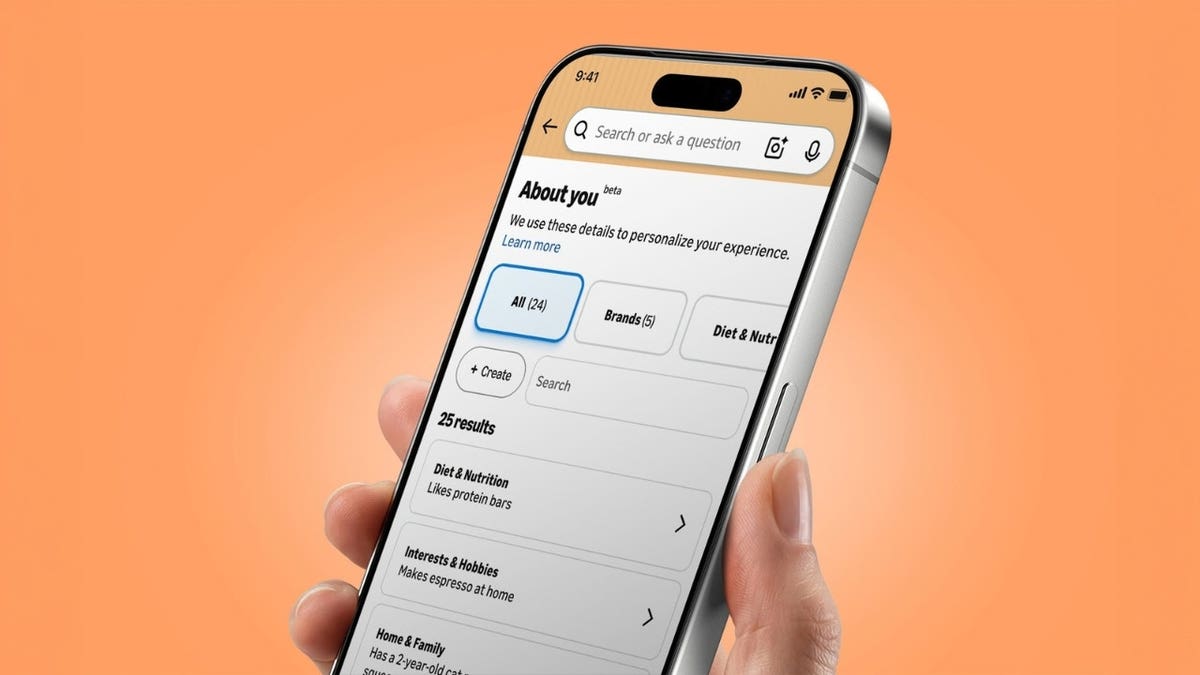
Amazon’s About You feature reveals the personal preferences and shopping habits the company uses to recommend products. (Amazon)
What is Amazon About You?
Amazon introduced About You in May 2026, although the feature has recently attracted widespread attention as shoppers share their profiles on social media. Amazon has personalized shopping recommendations for years. If you bought a coffee maker, you probably noticed suggestions for filters or other accessories soon afterward. That kind of recommendation has become familiar to anyone who shops online. Now, Amazon is taking personalization further with About You, a section that shows shoppers what the company believes about their interests and preferences.
According to Amazon’s announcement, the feature draws on information from several sources, including your purchase history, product reviews and items saved to Lists. Searches and conversations with Alexa for Shopping can also influence what Amazon learns.
For example, someone who regularly buys dairy-free milk might receive recommendations for other dairy-free products. A shopper researching gardening supplies could start seeing suggestions for fertilizer or companion plants. That sounds useful enough. However, Amazon can also develop assumptions about your personal preferences from individual purchases or short-lived interests. That’s where things can get awkward.
Amazon’s About You feature is already amusing shoppers
Some shoppers have started sharing screenshots of their Amazon profiles on social media. The results range from remarkably accurate to unintentionally hilarious. One Threads user discovered that Amazon had included the description „flat buttocks“ in her profile. „I stumbled upon a page of assumptions that Amazon has made about me based on my purchases and I’m literally speechless,“ she wrote.
She even acknowledged that the assessment wasn’t entirely wrong. Still, it’s hard to imagine anyone asking an online retailer for that particular evaluation. Meanwhile, another shopper shared a profile describing an obsession with minimalist, one-bag travel and a preference for Anker charging products. The shopper confirmed that Amazon had accurately identified those interests. A different user discovered that Amazon had recorded a „one-time specialty cheese exploration.“ The response was simple: „guilty.“
Other shoppers have shared descriptions such as „has no friends“ and „cannot keep real plants alive.“ One woman even reported that Amazon had described her as a „fifty-year-old man.“ These are the kinds of assumptions that can leave you wondering whether Amazon knows you at all.
My own profile included some remarkably specific observations. Amazon said I „do not like scary movies,“ „value professional grade audio equipment,“ „prefer dark chocolate treats“ and „enjoy swimming.“ It even noted my regular fresh flower purchases. But one entry really surprised me. Amazon claimed my mother had stayed at a hotel with another person, whom it identified by name, and had a negative experience. I certainly didn’t expect to find that kind of information about a family member in my shopping profile.
These examples show how an algorithm can turn shopping activity into surprisingly specific personal descriptions. Of course, Amazon’s conclusions may be incomplete or inaccurate. Buying something for a friend, for example, doesn’t necessarily mean you have any personal interest in that product.
YOUR PHONE MAY REVEAL DOCTOR, CHURCH AND PHARMACY VISITS
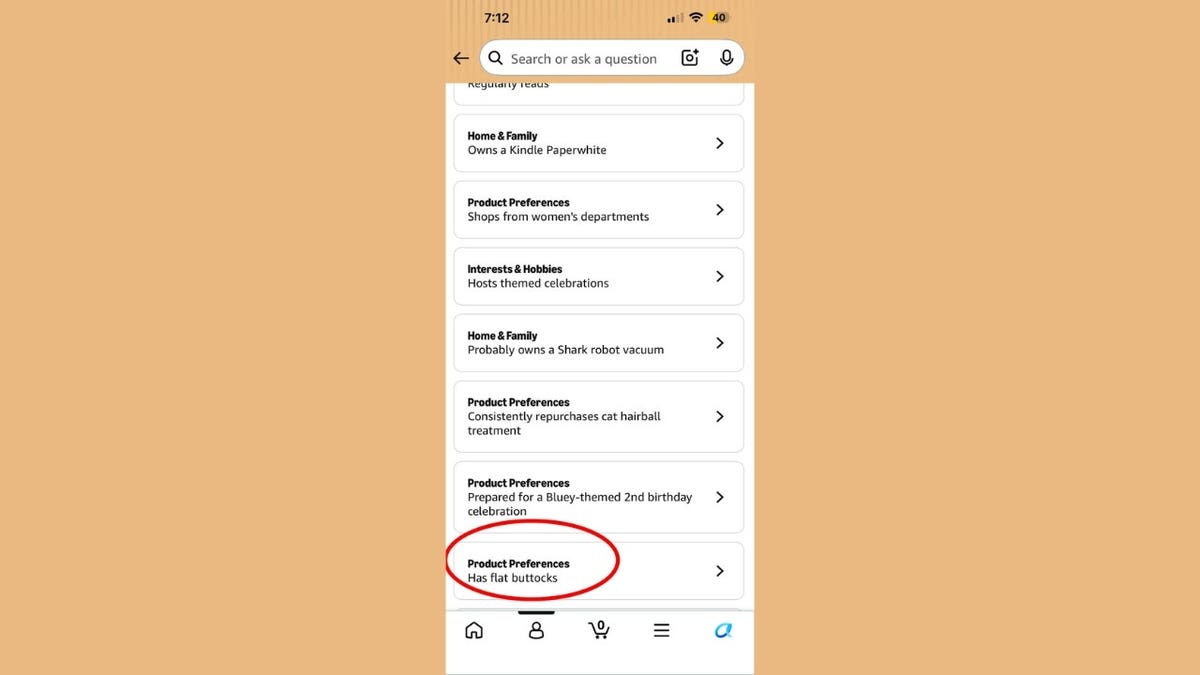
Amazon organizes what it knows about shoppers into categories, including diet, hobbies and family, which users can review and update. (Megan Montgomery/Threads)
Why Amazon knows so much about your shopping habits
Every time you interact with Amazon, you potentially give the company another clue about your preferences. A product search can suggest an interest, while a purchase provides a stronger signal about something you wanted at that moment. Amazon also uses information from its AI shopping assistant. If you tell Alexa for Shopping that your cat prefers a particular flavor of food, Amazon can use that detail to recommend similar products later.
According to the company, these interactions help make recommendations more relevant. However, a single purchase might reflect a temporary need rather than a lasting preference. Think about buying an unusual gift for a relative. You might suddenly find Amazon treating that purchase as evidence of a personal hobby. That raises another concern. Some purchases can indicate sensitive interests involving health, relationships or other aspects of your private life. Even when Amazon draws an incorrect conclusion, you may still want to remove it from your shopping profile.
How to see what Amazon knows about you
Amazon makes About You available through its Shopping app, mobile website and desktop website. You can review the information the company has associated with your profile and make changes.
On the Amazon Shopping app or mobile website
- Open the Amazon Shopping app or visit Amazon.com on your phone.
- Sign in to your Amazon account.
- Tap the Me tab.
- Select your name.
- Tap About You.
- Review the details Amazon has collected or inferred about your preferences.
If you don’t see About You using those steps, try this alternate route in the Amazon Shopping app:
- Tap You or the person icon at the bottom of the app.
- Select Account.
- Under Account Settings, look for Shopping preferences.
- Tap About You.
- Select Manage your information if that option appears.
On Amazon’s desktop website
- Visit Amazon.com and sign in.
- Move your cursor over your name above Account & Lists in the upper-right corner.
- Click your name or choose Who’s shopping? Select a profile.
- Select About You.
- Review the information displayed in your profile.
How to remove personal information from Amazon About You
Here’s where I would spend a few minutes if you use Amazon regularly. The company says About You lets you correct preferences, provide feedback and remove information you don’t want used for personalization.
Review and delete unwanted preferences
- Open About You using the steps above.
- Select a category to review the details Amazon has recorded or inferred about you.
- Find an entry you want to delete.
- Select Remove for that entry.
- When the confirmation prompt appears, select Remove again. You don’t need to provide a reason.
- Repeat these steps for other unwanted entries.
If you want to correct a detail instead of removing it, open the entry and look for an edit or feedback option. Make your changes and follow the prompts to save them. Amazon hasn’t established that every account will show identical editing controls. The available options may depend on the information displayed. Removing a detail from About You changes how Amazon uses that preference for personalization. It does not necessarily erase the original purchase, search or conversation from every Amazon system.
How to reduce what Amazon uses for recommendations
Editing your About You profile is a useful starting point. However, you should also review the activity that influences Amazon’s suggestions.
Remove items from your Amazon browsing history
Amazon provides browsing history controls that can help reduce recommendations based on products you’ve viewed.
- Sign in to Amazon.com.
- Open Browsing History from your account or browsing history controls.
- Review recently viewed products.
- Choose Remove from view for items you don’t want included in your visible browsing history, when that option appears.
- Look for Manage history if you want to adjust additional browsing history settings.
Removing a product from the browsing history display should not be treated as confirmation that Amazon has deleted every record of the interaction.
Adjust Amazon’s shopping recommendations
Amazon also provides controls for managing recommendations associated with past purchases.
- Sign in to your Amazon account.
- Visit Amazon’s recommendation preferences help page.
- Follow the available links to your recommendation settings.
- Review purchases or other activity that may influence your recommendations.
- Exclude eligible items from recommendations when Amazon provides that option.
This can be particularly helpful when you’ve purchased gifts or products that have nothing to do with your interests.
Review Alexa shopping interactions
If you regularly use Alexa for Shopping, consider what you share during those conversations. Amazon says the assistant can remember details you provide and use them to improve future shopping experiences. Ask „What do you know about me?“ to review the preferences Alexa can describe. Then use About You to correct or remove unwanted details. For additional privacy controls, review your Alexa privacy settings and voice history in the Alexa app or your Amazon account. Deleting voice recordings and removing shopping preferences are separate actions, so check both.
Can you completely delete your Amazon shopping profile?
Amazon provides ways to edit preferences and manage certain recommendation signals. However, the company hasn’t established that removing everything displayed in About You permanently deletes all underlying information. Your purchase history, for example, can remain associated with your account even after you exclude an item from recommendations. Amazon may retain certain transaction records for operational or legal reasons. Also, About You is only one part of Amazon’s broader personalization system. Correcting an assumption doesn’t necessarily stop Amazon from generating new recommendations based on future shopping activity. If privacy is your priority, review your browsing history, recommendation settings and Alexa privacy controls rather than relying exclusively on the new profile page.
Kurt’s key takeaways
I’ve always found Amazon’s recommendations fascinating, but seeing 81 personal details in my own profile was an eye-opener. Some were surprisingly accurate. Others, including information about my mother, left me wondering how Amazon reached those conclusions. I appreciate being able to review and remove these details, but I’d like more transparency about what happens to that information afterward. My advice? Take a few minutes to check your own Amazon About You profile. You might be surprised by what the company thinks it knows about you.
Would you be comfortable with Amazon building a personality profile from everything you buy and search for, or has online shopping personalization gone too far? Let us know by writing to us at CyberGuy.com.
Sign up for my FREE CyberGuy Newsletter
- Get my best tech tips, urgent security alerts and exclusive deals delivered straight to your inbox.
- For simple, real-world ways to spot scams early and stay protected, visit CyberGuy.com – trusted by millions who watch CyberGuy on TV daily.
- Plus, you’ll get instant access to my Ultimate Scam Survival Guide free when you join.
CLICK HERE TO DOWNLOAD THE FOX NEWS APP
Copyright 2026 CyberGuy.com. All rights reserved.